Bring Beat Shaper into Ableton Live and generate loops in real time
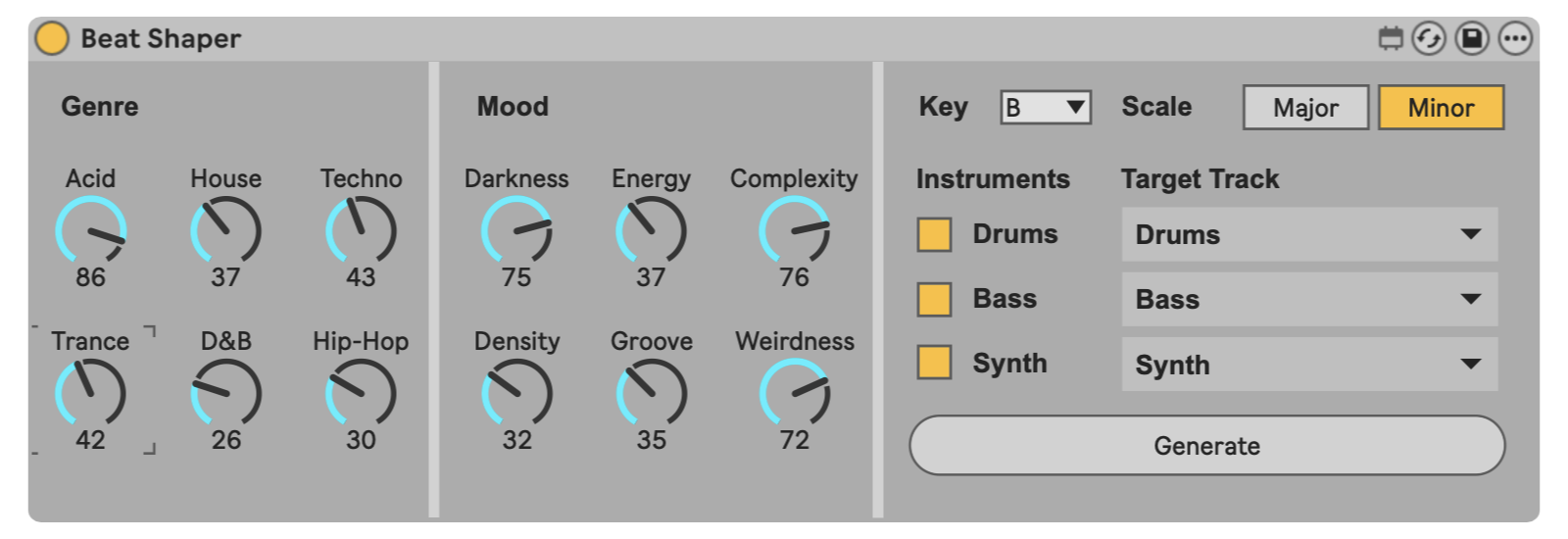
The genre dials guide the overall style of the generated loop. Turn up a single genre for a more focused result, or blend several genres to create hybrids, such as house-influenced drums with a bit of techno or hip-hop feel.
These controls are not strict presets. They act more like creative direction. Each dial nudges the generated rhythm, phrasing, and musical choices toward that style while still allowing variation from one generation to the next.
The mood dials shape the character and behavior of the generated loop. Use them to make the result feel darker, busier, looser, stranger, or more intense.
The Generation section brings together the musical direction, instrument choices, and track routing that shape each new idea. Key and Scale guide the tonal center for bass and synth parts, while setting Key to Any leaves the generation engine to decide.
Drums, bass, and synth can be generated one at a time or together as a cohesive loop. Beat Shaper uses the enabled instruments and current settings to create parts that are designed to work together, while still leaving room for variation from one generation to the next.
Target Track menus connect each generated part to a MIDI track in your Live Set. These menus update automatically as tracks are added, removed, moved, or renamed, helping Beat Shaper stay connected to the current state of your session.
For the cleanest results, drums, bass, and synth should usually be assigned to separate MIDI tracks. When the Generate button is pressed, the current settings are sent to the Beat Shaper generation engine and new musical ideas are added to your Live Set.
You might also like
Enhance creativity and break through creative blocks
Supported by