Streamline your workflow with powerful tools designed to help your team collaborate, iterate, and deliver exceptional products at scale.
Beat Shaper is built around fast musical iteration: generate a loop, edit the notes, adjust the sound, and keep moving. The synthesizer engine that makes the bass and lead tracks feel like more than placeholder MIDI. It gives each generated idea a real instrument voice from the moment it appears.
Rather than relying on static presets or generic playback, the synthesizer is designed as a practical production synth inside. Its controls cover the essentials: oscillators, detuning, filter shaping, pitch movement, LFO modulation, and envelopes. That makes it simple to make quick changes, but still flexible enough to move from warm basses to sharp leads, soft plucks and noisy textures.
The synthesizeri also helps Beat Shaper stay connected to the wider music production ecosystem. Its patch structure is designed to translate cleanly to other virtual synths. Beat Shaper currently supports exporting compatible patches for Ableton Drift. That means you can start inside Beat Shaper, then continue shaping your sound in Ableton Live when you are ready to move deeper into arrangement, mixing, or performance.
The synthesizer includes dedicated patch libraries for both melodic and low-end parts. Beat Shaper currently includes 40 lead patches and 50 bass patches, giving generated loops a wide range of starting points.
The lead patches cover everything from clean melodic tones and plucky sequences to brighter, more animated synth lines. They are built to sit clearly above the drums and bass, while still leaving room for further editing and processing. Here are some sample lead patches:
The bass patches focus on weight, movement, and groove. Some are simple and rounded, while others use detuning, deep filter resonance, and sub oscillators to create more aggressive and gritty low-end parts. Since Beat Shaper generates editable MIDI, these patches are not locked to a single loop. You can change the notes, regenerate the part, or export the result and keep working elsewhere. Here are some sample bass patches:
Along with patch downloads, Beat Shaper also supports audio stem export for synth tracks. Free tier users can download MP3 stems, while Creator and Producer tier users can download WAV stems for higher quality production workflows.
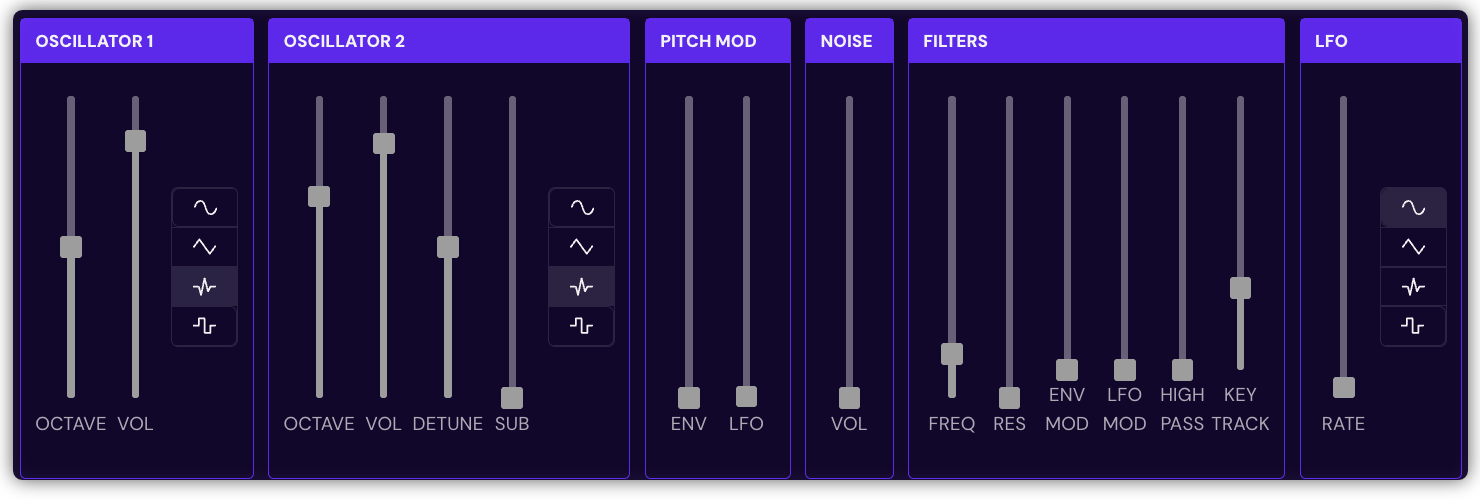
The synth uses a two-oscillator subtractive synth architecture with additional sub oscillators, noise, filtering, modulation, and envelopes. Oscillator 1 and Oscillator 2 provide the main tone, with selectable waveforms and independent level controls. Oscillator 2 can be detuned and offset from the main pitch, which makes it useful for both thicker basses, harmonically rich leads.
In parallel to the second oscillators, the synth includes an additional sub oscillator. This gives the synth extra low-end support without requiring the user to manually patch a separate bass layer. The Sub control brings that weight forward when needed, especially for bass patches.
The signal then passes through a filter section with cutoff, resonance, modulation depth, LFO modulation, high-pass filtering, and key tracking. This gives the synth its classic subtractive shaping capability. The modulation envelope can drive pitch and filter motion, while the LFO can affect pitch, filter frequency, and oscillator detune.
Two envelopes shape the sound. The modulation envelope controls movement such as pitch and filter animation. The amp envelope controls the final volume contour, from short percussive plucks to longer sustained notes.
The synth gives Beat Shaper’s generated basslines and leads their own playable synth voice. Generate a loop, choose a patch, adjust the sound, then export MIDI, stems, or a compatible Drift patch when you are ready to keep producing. Open Beat Shaper and try shaping your next bassline or lead.
You might also like
Enhance creativity and break through creative blocks
Supported by